Signature & Review
Send the plan to an external reviewer for signature, or share a read-only link.
What this is for
Signature & Review is the workflow for getting reviewers — typically auditors, consultants, or food safety partners outside your organization — to view and sign your plan without giving them edit access.
Two flavours:
- Request signature — send an email with a secure token link. The reviewer opens the link, reviews the plan, and submits a drawn or typed signature. The signature is stored back on the plan.
- Share plan — create a read-only link you can paste in chat, email, or a doc. The recipient sees the plan but doesn’t sign anything.
You can request multiple signatures on the same plan (e.g., from two different auditors) and track them separately.
Common tasks
How to request a signature
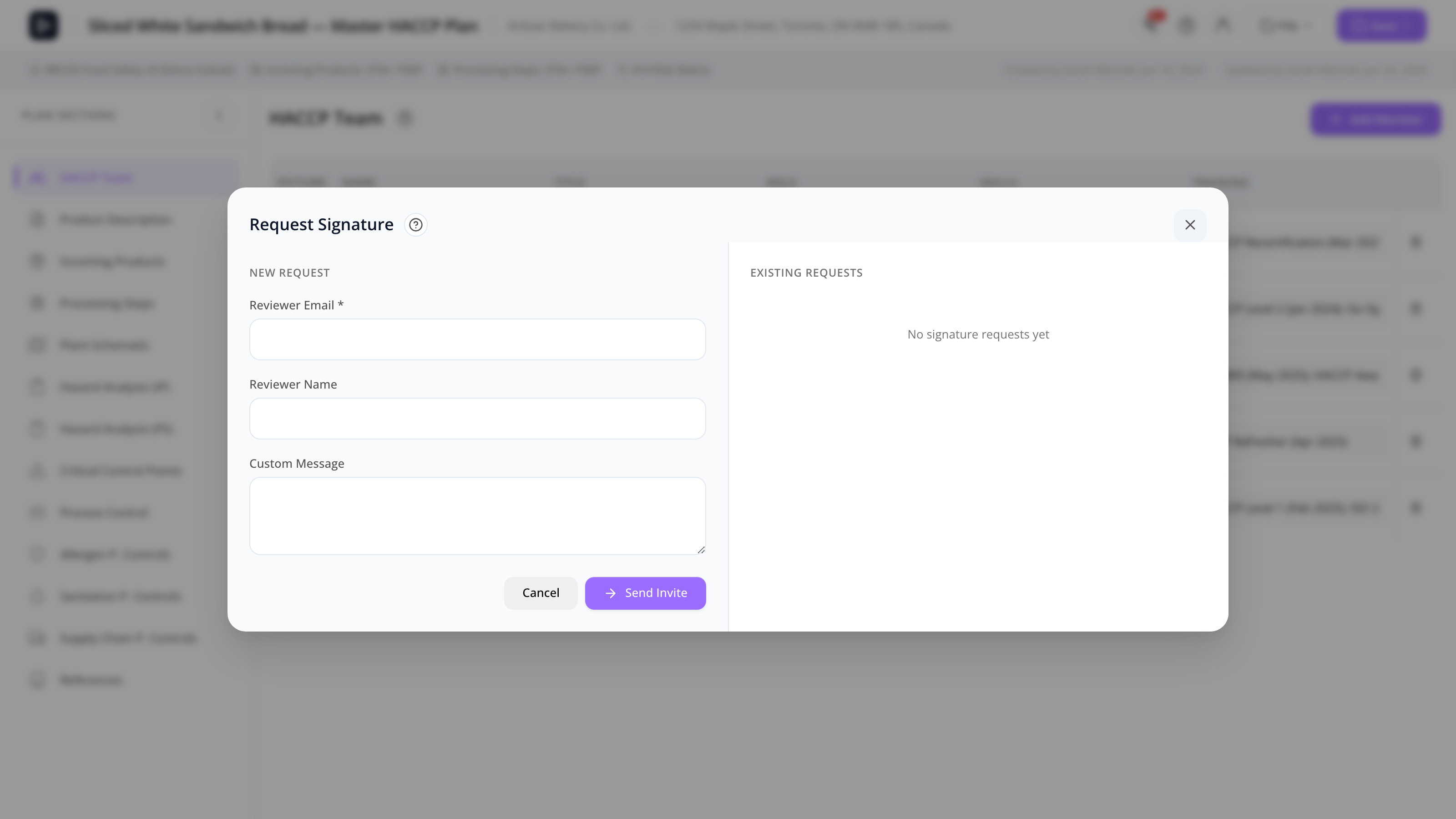
- With the plan open, click File → Request signature.
- The modal opens.
- Enter the reviewer’s email and an optional message (sent in the email).
- Click Send.
The reviewer receives a branded email from MyHaccpPlan with a secure link. Clicking the link takes them to a public review page (/review/<token>), where they can:
- View the plan in read-only mode (the plan data is frozen at the time of the request).
- Sign the plan (drawn or typed signature).
- Submit.
You see the signed status in the Pending Reviews modal.
How to share a read-only link
- With the plan open, click File → Share plan.
- The modal generates a unique read-only URL.
- Copy and send it to the recipient.
The link doesn’t expire by default and gives the recipient view-only access to the plan as it currently exists. (Note: this is a snapshot link; later edits aren’t reflected unless you generate a new link.)
How to track pending reviews
Click File → Pending reviews. The modal lists every signature request:
- Pending — sent but not yet signed.
- Signed — completed, with date and signature preview.
Click any entry for details (email, link, signed date, signature image).
How to review and accept a signed plan
When a reviewer signs, the signature is recorded against the request. Open the Pending Reviews modal to see it. The signature is also embedded in the plan’s audit trail and shown on the printed plan.
If you want to require the reviewer’s edits before approving (i.e., they suggested changes), apply those edits to the plan first, then re-request signature on the new version.
How to handle “plan changed since signature” warnings
If you save the plan after a signature has been recorded, MyHaccpPlan warns that the signed version no longer matches the current version. Options:
- Send a fresh signature request to re-sign the new version.
- Acknowledge the warning and proceed (the audit trail will show the divergence).
Screen reference
Request Signature modal
| Field | Description |
|---|---|
| Reviewer email | The recipient. |
| Message | Optional note added to the email. |
| Send | Sends the email. |
| Cancel | Closes without sending. |
Pending Reviews modal
| Element | Description |
|---|---|
| Request rows | One per request: reviewer email, status (pending/signed), date sent. |
| Click row | Opens detail with link, signature preview, and timestamps. |
| Resend | (Pending only) re-sends the email. |
| Revoke | Cancels the request (token becomes invalid). |
Review page (/review/<token>)
What the reviewer sees:
| Section | Description |
|---|---|
| Plan view | Read-only render of the plan. Same sections as the editor. |
| Print preview | Reviewer can open and print. |
| Signature pad | Draw with mouse or finger, or type to use a typed-signature font. |
| Submit | Records the signature back on the plan. |
Share Plan modal
| Element | Description |
|---|---|
| Generated URL | Copy-paste link. |
| Copy | Copies to clipboard. |
| Close | Closes the modal. |
FAQs
How long does a signature link stay active? Until you revoke it. Tokens don’t expire automatically. To invalidate a link, use Revoke on the request from Pending Reviews.
Can the reviewer see who else has been asked to sign? No. Each reviewer sees only the plan and their own signature pad. Signatures are private until you receive them.
Can I require multiple signatures before approval? There’s no built-in multi-signature workflow yet. You can send multiple requests (one per reviewer) and track them separately. Approval is a separate, internal step (Approval flow).
Does the reviewer need a MyHaccpPlan account? No — the review page uses token authentication. The reviewer just clicks the link.
Can I send a signature request to multiple emails at once? Each request is per-email. Send several requests if you want signatures from several reviewers.
Does the signature show up on the printed plan? Yes — the signed signatures are listed in the audit trail section of the cover page and at the end of the printed plan.
What if the reviewer wants to suggest changes? The review page is read-only — reviewers can’t edit. They’d have to email you suggestions outside MyHaccpPlan. Once you’ve made the edits, send a fresh signature request.
Is the signature a legally binding electronic signature? The system records the signature image, the reviewer’s email (verified by the token), and the timestamp. Whether that meets the legal threshold for an “e-signature” depends on your jurisdiction and the auditor’s requirements. For high-stakes legal signatures, use a dedicated e-signature provider and link to the signed PDF from References.