HACCP Team
Document who is on your HACCP team — names, titles, roles, skills, and training records.
What this is for
Every HACCP plan needs to identify the team responsible for it. The HACCP Team section is a grid where you list each member with the information your auditor expects to see: their picture, name, title, role on the team, relevant skills, and training records.
The team appears on the printed plan and is included in the cover/audit trail when the plan is exported.
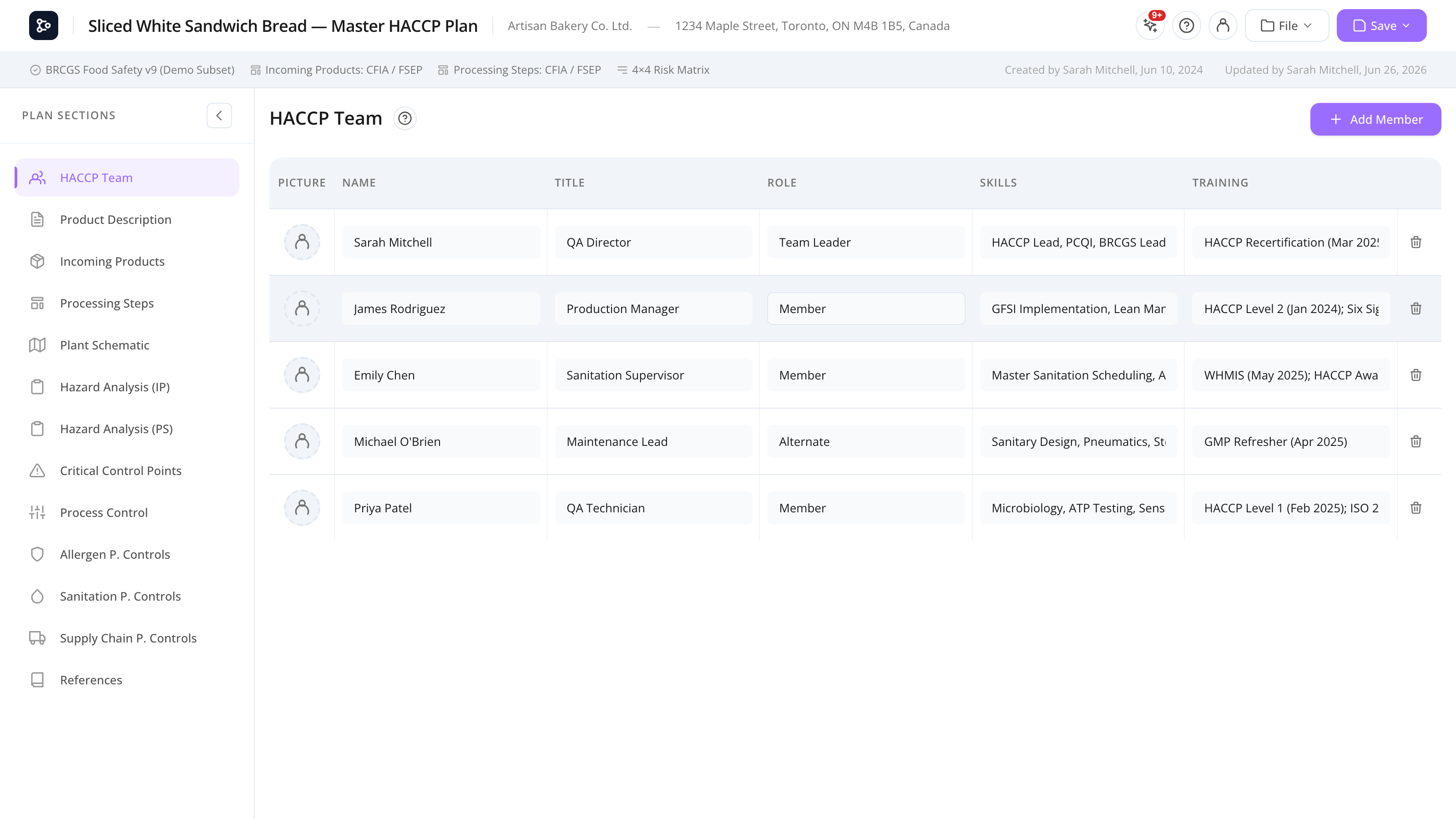
Common tasks
How to add a team member
- Open the HACCP Team section from the sidebar.
- Click + Add member (top of the grid).
- Fill in:
- Picture — click to upload, or drag-and-drop a JPG/PNG. The image is resized automatically.
- Name
- Title (job title at the company, e.g., QA Manager)
- Role (HACCP role, e.g., Team Leader, Member, Alternate)
- Skills (comma-separated or one per line, e.g., HACCP Lead, PCQI)
- Training (relevant courses or certifications)
- The row saves automatically as you edit (inline edit).
How to edit a team member
Click directly on any cell to edit it inline. Changes save as you type.
How to delete a team member
- Hover the row.
- Click the trash icon at the right edge.
- Confirm.
The row is removed. There’s no undo from the same screen — re-add the member if you change your mind.
How to reorder team members
Drag the row handle (left edge) up or down. The order is saved with the plan.
How to replace a team member’s picture
Click the picture cell on an existing row and pick a new image. The old image is replaced.
Tip: Pictures aren’t required. If you don’t upload one, a coloured initial circle is shown instead.
Screen reference
Grid columns
| Column | Description |
|---|---|
| Picture | Member’s photo or initial avatar. |
| Name | Member’s full name. |
| Title | Job title at the company. |
| Role | Role on the HACCP team (Leader, Member, Alternate, etc.). |
| Skills | List of relevant skills. Free-form. |
| Training | Training records, certifications, dates. Free-form. |
| Actions | Trash icon to delete. Visible on hover. |
Toolbar
| Control | What it does |
|---|---|
| + Add member | Adds a blank row at the bottom. |
FAQs
Is there a minimum number of team members? No software-enforced minimum, but most HACCP standards require a multi-disciplinary team — typically a leader plus 3–5 members covering production, QA, sanitation, and engineering. Check your specific standard for guidance.
Can I import the team from a previous plan? Yes — open the previous plan, copy the names manually, or duplicate the plan via the cloud browser and rename it. There’s no built-in “copy team” tool yet.
The picture I uploaded looks blurry — why? Pictures are auto-resized to a small thumbnail to keep plan exports manageable. For sharp output, upload a square image at least 200×200 pixels.
Can I record training expiry dates? The Training column is free-form, so you can write something like “WHMIS — Sept 2027” or “HACCP Lead recertified Mar 2025”. There’s no automatic expiry tracking.
Does the team appear in the printed plan? Yes. The team grid is rendered on its own page in the print preview and PDF export.