Marketplace
Browse and download global libraries (standards, decision trees, matrices) into your customer library.
What this is for
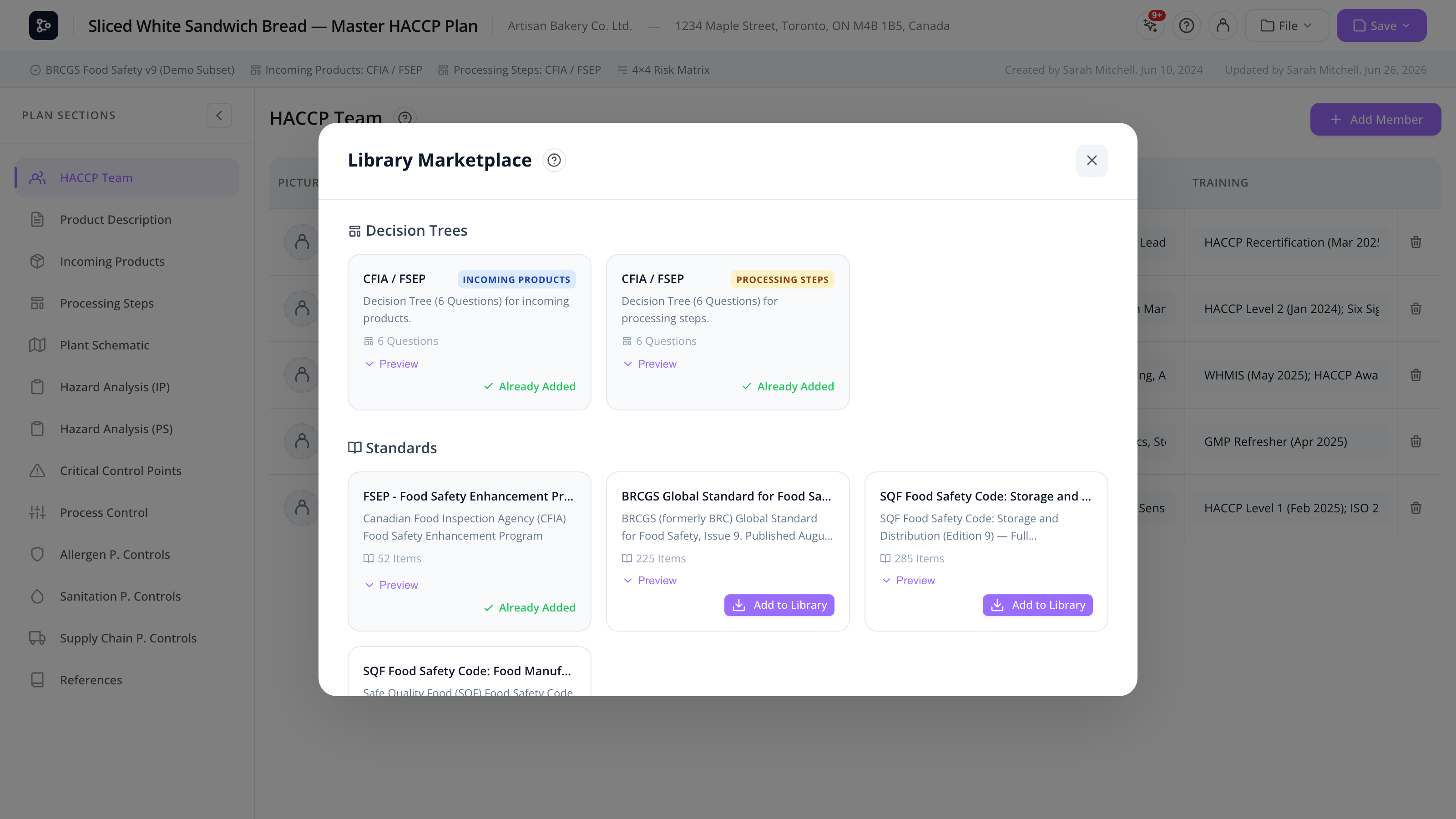
The Marketplace is the single place to browse the global libraries — standards, decision trees, and risk matrices — that Datahex super admins maintain centrally. From here, you copy the ones you need into your customer library, where they become editable.
This is the bridge between Datahex’s curated content (always up-to-date with published standards) and your organization’s own customizations.
The Marketplace is reachable from each of the three library modals (Standards, Decision Trees, Matrices) — the Marketplace button at the top of the sidebar.
Common tasks
How to browse global libraries
- Open the relevant library (Standards / Decision Trees / Matrices).
- Click Marketplace at the top of the sidebar.
- The modal shows cards for every global item available, with name, description, and (for trees) type.
The cards are filtered by your current locale — French content appears when you’re in French, English when in English.
How to add an item to your customer library
- On a card, click Add to my library (or Already in library if you’ve already added it).
- The item is copied into your customer library.
- The card switches to In library to show the result.
The customer copy is independent — edit it freely without affecting the global version.
How to know if a global item is already in your library
Each card shows a status badge:
- Add to my library — not yet copied.
- In library — already in your customer library (the local copy may have been edited).
How to update a previously-downloaded item
There’s no automatic update. To pick up changes from the global version:
- Delete (or rename) your customer copy.
- Re-add the global item from the Marketplace.
This gives you a fresh copy and lets you re-customize from the new baseline.
Screen reference
Modal layout
| Element | Description |
|---|---|
| Tab / type filter | (For decision trees) Filter by Incoming / Processing. |
| Card grid | One card per global item. |
| Close | Returns to the originating library. |
Card
| Element | Description |
|---|---|
| Name | Item name. |
| Description | Brief summary. |
| Type badge | (For trees) Incoming / Processing. |
| Locale | Language of the item. |
| Add to my library / In library | Action button. |
FAQs
Who maintains the global libraries? Datahex super admins. They publish updates to standards, decision trees, and matrices as published versions of those frameworks change.
If Datahex updates a global standard, does my plan see the update? No — your customer copy stays as it was when you added it, and your plan embeds a snapshot at plan creation. To pull updates, re-add from the Marketplace and re-link your plan.
Why don’t I see any items? Either no global items exist for your locale (e.g., no French version of a particular standard), or your account doesn’t have access to global libraries. Check with your admin.
Can I un-add an item from my library? Yes — close the Marketplace, find the item in your customer library, and delete it. (Plans already using a snapshot are unaffected.)
Can my customer share items with another customer?
Not via the Marketplace (that’s only Datahex → Customer). Use the Export function in each library to create a .hplns / .hplnd / .hplnm file and share it directly.
Why are some items only in English? Datahex publishes new content in the source language and translates over time. If a French version is missing, contact Datahex to request it.