Supply Chain Controls
A rich-text section for documenting supplier approval, incoming inspection, and traceability.
What this is for
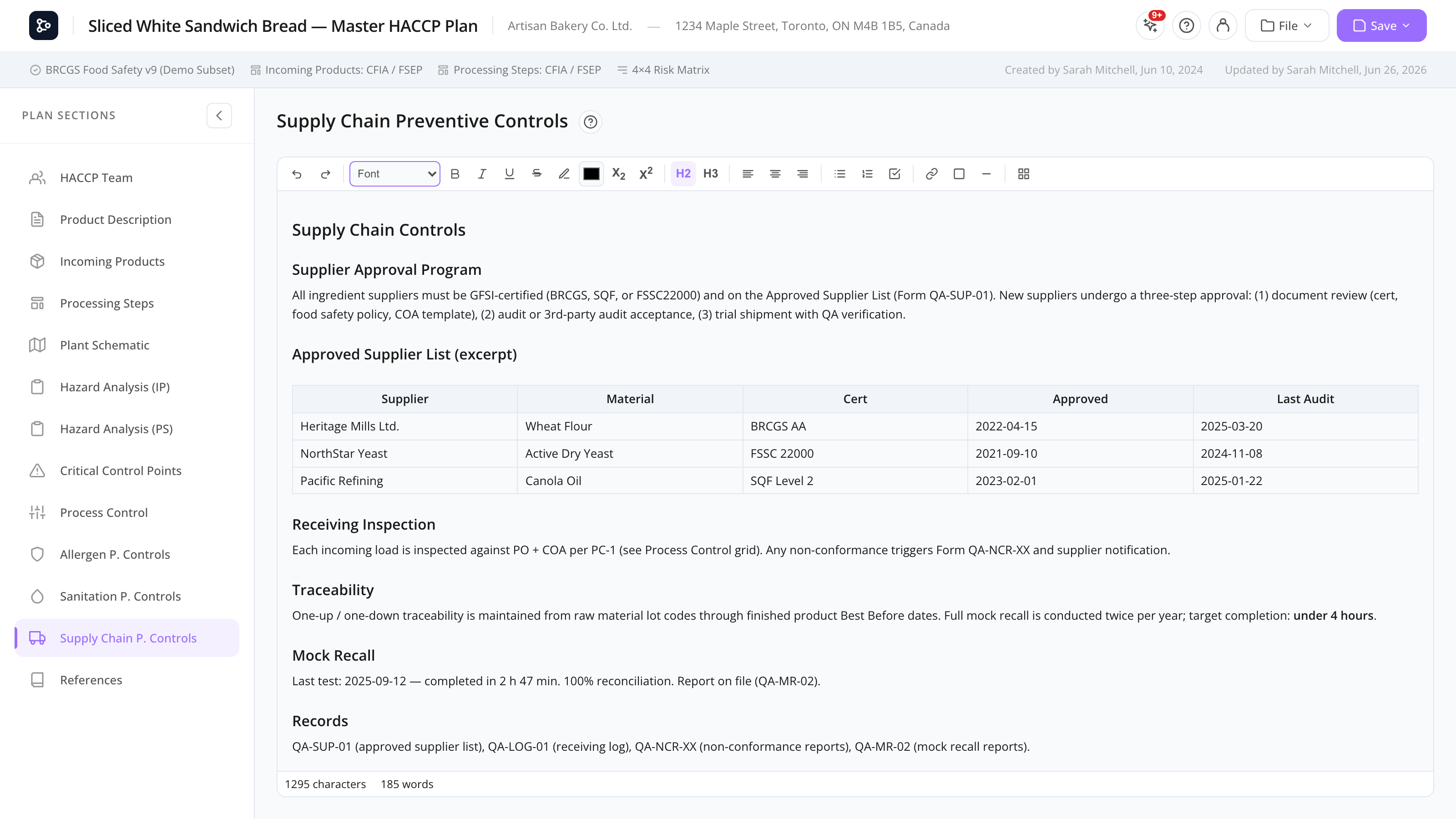
The Supply Chain Controls section documents how you manage the safety of inputs from outside your facility — supplier approval programs, incoming material inspection, certificate of analysis (COA) requirements, mock recall procedures, and traceability systems.
It’s the third of three identical rich-text Control sections, alongside Allergen Controls and Sanitation Controls. All three share the same Tiptap-based editor with full formatting, tables, and images.
Common tasks
How to structure your supply chain program
A common layout:
- Supplier approval program — criteria, audit frequency, COA requirements, ongoing review.
- Approved supplier list — table of suppliers with certifications and approval dates.
- Incoming material inspection — criteria for acceptance/rejection per material type.
- Receiving procedures — how shipments are checked, recorded, and stored.
- Traceability — how lot codes link from raw materials → finished product → customers.
- Mock recall — procedure, frequency, last test results.
- Records — where receiving logs and supplier files are kept.
How to add an approved supplier list
- Add an H2 heading.
- Insert a table with columns like Supplier / Material / Cert / Approval date / Notes.
- Fill in the rows.
If you maintain the list in Excel or another system, link to it via References and keep a summary here.
How to document the receiving procedure
Use numbered lists for steps. Add screenshots or photos of the receiving area or COA examples by dragging images into the editor.
Screen reference
Same toolbar and editor as Allergen Controls. See that page for the full toolbar reference.
FAQs
What’s the difference between this section and References? Supply Chain Controls is your written program. References holds links to external resources (regulations, certifications, supplier portals). Use both: write the procedure here, link to external resources from References.
Can I track supplier approval expiry dates here? You can list them in a table, but there’s no automatic alert when one expires. For automated tracking, consider a separate supplier management tool and link to it from References.
Is there a structured supplier list elsewhere in MyHaccpPlan? Not as a structured database — the supplier list lives in this rich-text section as a table. (Datahex’s Supplyline product is a structured supplier compliance platform; ask your account manager about integrations.)
Should I document mock recall here or in References? Document the procedure here. Past test results can be linked from References or kept in a separate file referenced by name.
Can I print just this section? Use File → Print preview to see the full plan, then your browser’s print dialog to print specific pages. There’s no per-section print button.