Company registration
Self-register your company so an admin can review and approve access.
What this is for
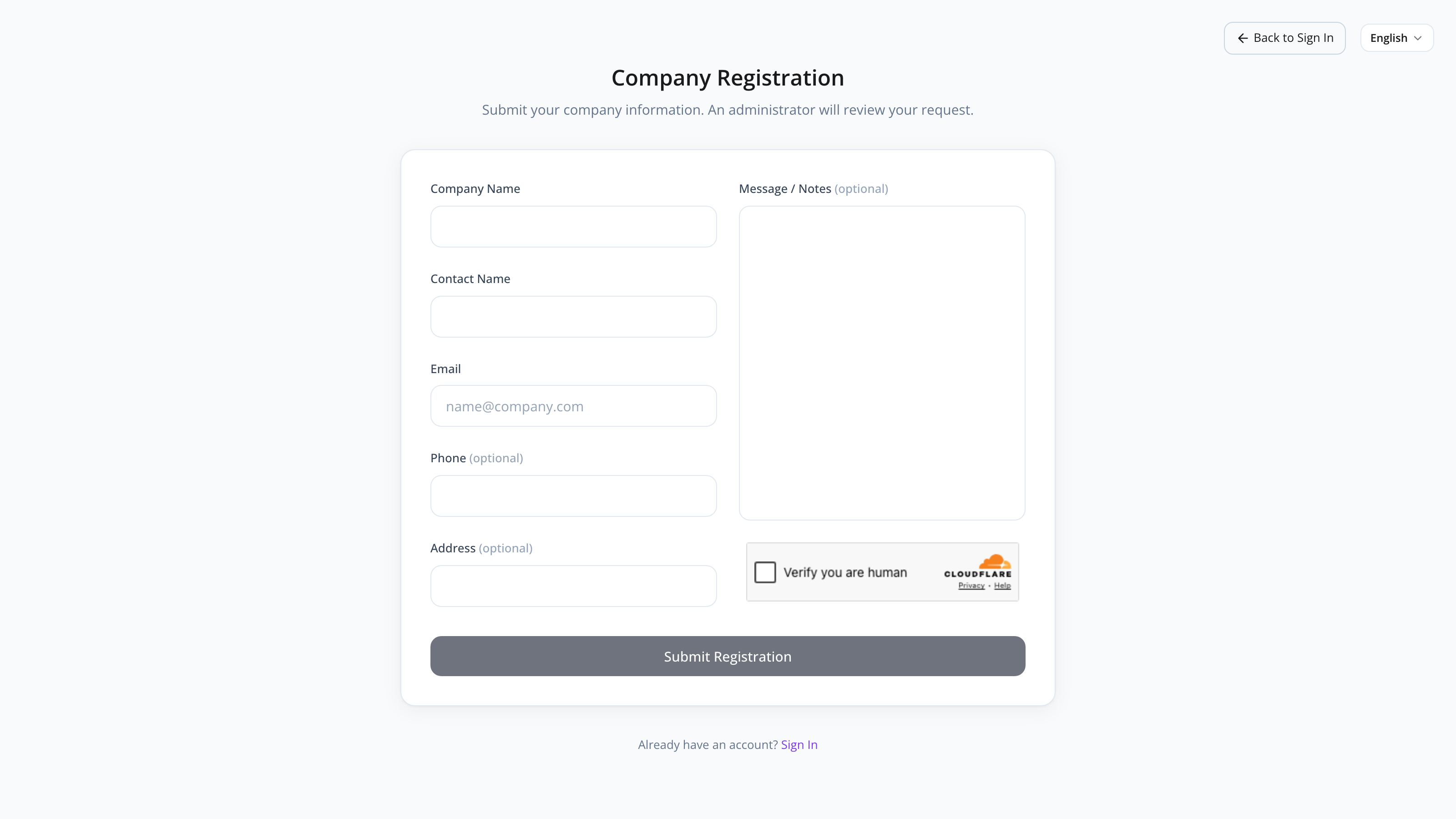
The Registration form lets a new customer request access to MyHaccpPlan without contacting Datahex directly. You fill in your company and contact details, and a Datahex admin reviews the request. Once approved, you’ll receive a welcome email with login instructions.
This is a public page — no account needed.
Common tasks
How to register your company
- From the login page, click Register company.
- Fill in the Company Name (required) and Contact Name (required).
- Enter your Email (required) — this becomes your sign-in email once approved.
- (Optional) Add Phone, Address, and a Message explaining your context.
- Complete the CAPTCHA at the bottom.
- Click Submit registration.
You’ll see a confirmation message: “Registration submitted. Pending approval.” You can return to the login page from there.
The CAPTCHA is required to prevent automated abuse. If it doesn’t load, refresh the page or check that your browser isn’t blocking third-party scripts.
What happens after submission
- A Datahex admin sees your registration in the Registrations tab of the Admin panel.
- They review the request and either approve or reject it (with an optional reason).
- If approved: a customer is created, a welcome email is sent to the contact email with sign-in instructions, and you can log in.
- If rejected: you receive an email with the reason (if one was provided).
Approval typically happens within one business day.
How to follow up on a registration
If you haven’t heard back within a couple of business days:
- Check your email’s spam/junk folder.
- If still nothing, contact Datahex support directly with your company name and submission date.
Screen reference
Form fields
| Field | Required | Description |
|---|---|---|
| Company Name | Yes | Your legal/business name. |
| Contact Name | Yes | The person we’ll reach out to. |
| Yes | Becomes your login email. Use a real, monitored address. | |
| Phone | No | International format preferred. |
| Address | No | Free-form. |
| Message / Notes | No | Tell us about your use case, certification standard, or any context that helps approval. |
| CAPTCHA | Yes | Bot-protection CAPTCHA. |
Buttons
| Button | What it does |
|---|---|
| Submit registration | Sends the form (disabled until CAPTCHA is solved). |
| Back to login (top-left) | Returns without submitting. |
| Sign in (footer link) | If you already have an account. |
FAQs
How long does approval take? Usually within one business day. Datahex admins are notified by email when a new registration arrives.
What email address is used for the welcome email? The one you put in the Email field. Make sure it’s correct and you can access it.
The CAPTCHA isn’t loading. Refresh the page. If it still doesn’t load, your browser may be blocking the CAPTCHA script — try a different browser or disable an aggressive ad-blocker.
I made a typo. Can I submit again? Yes. Submit a second registration with the correct information and add a message asking the admin to discard the first one.
Can I have multiple users on one company account? Yes — but only one initial admin user is created on approval. After approval, that admin can invite teammates from the dashboard.
What if my registration is rejected? You’ll receive an email with the reason (if provided). Common reasons are: typo in email, duplicate registration, or unclear company details. You can submit again.