Hazard Analysis (Processing)
The consolidated table of every evaluated hazard from your processing steps, across every flow diagram.
What this is for
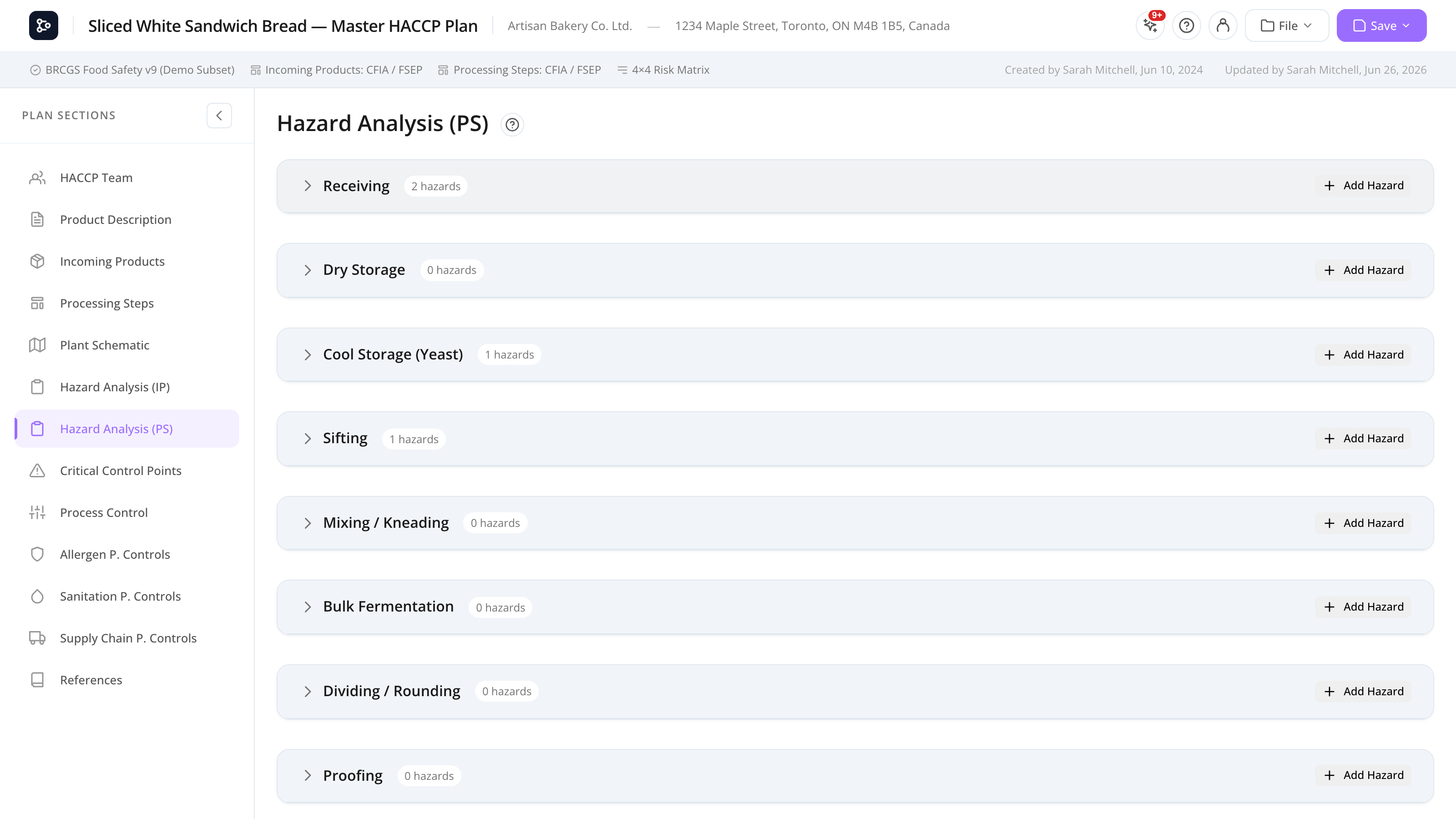
The Hazard Analysis (Processing Steps) section mirrors the Incoming version but pulls its data from your Processing Steps flow diagrams. Every hazard attached to a step (HACCP) node shows up here as a row, grouped into a collapsible block per step.
Crucially, this table aggregates step hazards across every flow diagram tab, not just the one you happen to be viewing in the Flow Editor. If your plan has more than one diagram, the table shows them all together.
Like its Incoming counterpart, the table is read-only here — clicking a row opens the hazard modal at the source step for editing. It also feeds the printed Hazard Analysis (PS) page, which carries the full evaluation detail (see Print preview & export).
Common tasks
How to read the table
Each step is a collapsible block. The block header shows the step name and its hazard count; click it (or its chevron) to expand the hazard rows. Each row has the same columns as the Incoming table:
- Type — a coloured badge: B / C / P / M / R / Q (or a custom type).
- Hazard — the hazard description.
- Risk — the risk level from the matrix, with the S: / P: values. N/D if not scored.
- Q1–Q6 — the recorded decision-tree answers. Hover a question header for its full text.
- Controlled at — control-type pills (PRP / CCP / PC / PCP), PCP controls, program-code pills, and expandable justification / steps detail.
When the plan has more than one diagram and you’re viewing all diagrams, each step block shows its source diagram in parentheses after the step name (e.g. Storage (General Flow)) so you can tell apart steps that share a name across diagrams.
How to focus on one diagram
If your plan has more than one diagram, a Diagram dropdown appears at the top of the section. Leave it on All diagrams to see every tab’s step hazards together, or pick a single diagram to scope the table to just that tab. With a single diagram chosen, the parenthesised diagram names drop away. (The dropdown only appears when there’s more than one diagram — see Processing Steps for how diagram tabs work.)
How to edit a hazard
- Click the row.
- The hazard modal opens at the source step.
- Edit the hazard, change the evaluation, or replace the program item.
- Save.
Coming back to this table, your changes are reflected.
How to read a program code
When a control references a prerequisite-program item, its code (e.g. A.1.1.1) appears as a pill in the Controlled at column. Hover the code to read the program’s full text in a tooltip — no need to open the program.
How to expand justification or steps detail
Click the Just: pill to expand the full justification, or the Steps: pill to expand the list of linked processing steps. Click again to collapse.
Screen reference
Columns
| Column | Description |
|---|---|
| Type | Hazard category badge (B / C / P / M / R / Q / custom). |
| Hazard | The hazard description. |
| Risk | Risk level from the matrix, with the S: / P: values. N/D if not scored. |
| Q1–Q6 | Recorded decision-tree answers. Hover the header for the question text. |
| Controlled at | Control-type pills, PCP controls, program-code pills (hover to read), and expandable justification / steps. |
Step blocks & diagram scope
| Element | What it does |
|---|---|
| Block header | Shows the step name (with its diagram in parentheses when viewing all diagrams) and its hazard count. Click to expand or collapse. |
| Diagram filter | Appears only with more than one diagram. All diagrams aggregates every tab; pick one to scope the table. |
| Program-code pill | Hover to read the full program text in a tooltip. |
| Just: / Steps: pill | Click to expand the truncated justification or linked steps. |
FAQs
Why are processing-step hazards from other diagrams showing here? By design. This table aggregates step hazards across every flow diagram in the plan so your hazard analysis is complete, not limited to the tab you last opened in the Flow Editor.
How do I focus on one diagram? Use the Diagram dropdown at the top of the section and pick the tab you want. Set it back to All diagrams to see everything together. The dropdown only shows when the plan has more than one diagram.
Two steps have the same name — how do I tell them apart? When viewing all diagrams, each step block shows its source diagram in parentheses (e.g. Storage (General Flow)). Filtering to one diagram, or seeing only one diagram in the plan, removes the qualifier.
Why is a step’s hazard not in this table? Either the hazard isn’t evaluated yet, or the step node was deleted from the diagram and its hazard was orphaned. Re-add the step or complete the evaluation in Processing Steps.
How do I read a program code without opening the program? Hover the program-code pill (e.g. A.1.1.1) in the Controlled at column. A tooltip shows the program’s code, name, and full text.
Can I edit a hazard inline from this table? No — click the row to open the modal at the source step, where the data lives. This avoids maintaining the same edit in two places.
The processing step is referenced as a control on an Incoming hazard — does it appear here too? No. This table only shows hazards attached to steps. Incoming-product hazards that list a step as a control point appear in the Incoming table only; the link shows inside that hazard’s control detail.
Where do I get the full printed evaluation? The printed Hazard Analysis (PS) page prints in landscape with the full evaluation detail — decision-tree legend, pathogens and examples under the hazard name, and the complete control conclusion. Steps are listed in a fixed B-C-P-M-R-Q type order (alphabetical within each type), and multi-diagram step names stay qualified with their tab. See Print preview & export.