Online Hazards
Browse and select hazards from the central reference database instead of typing them.
What this is for
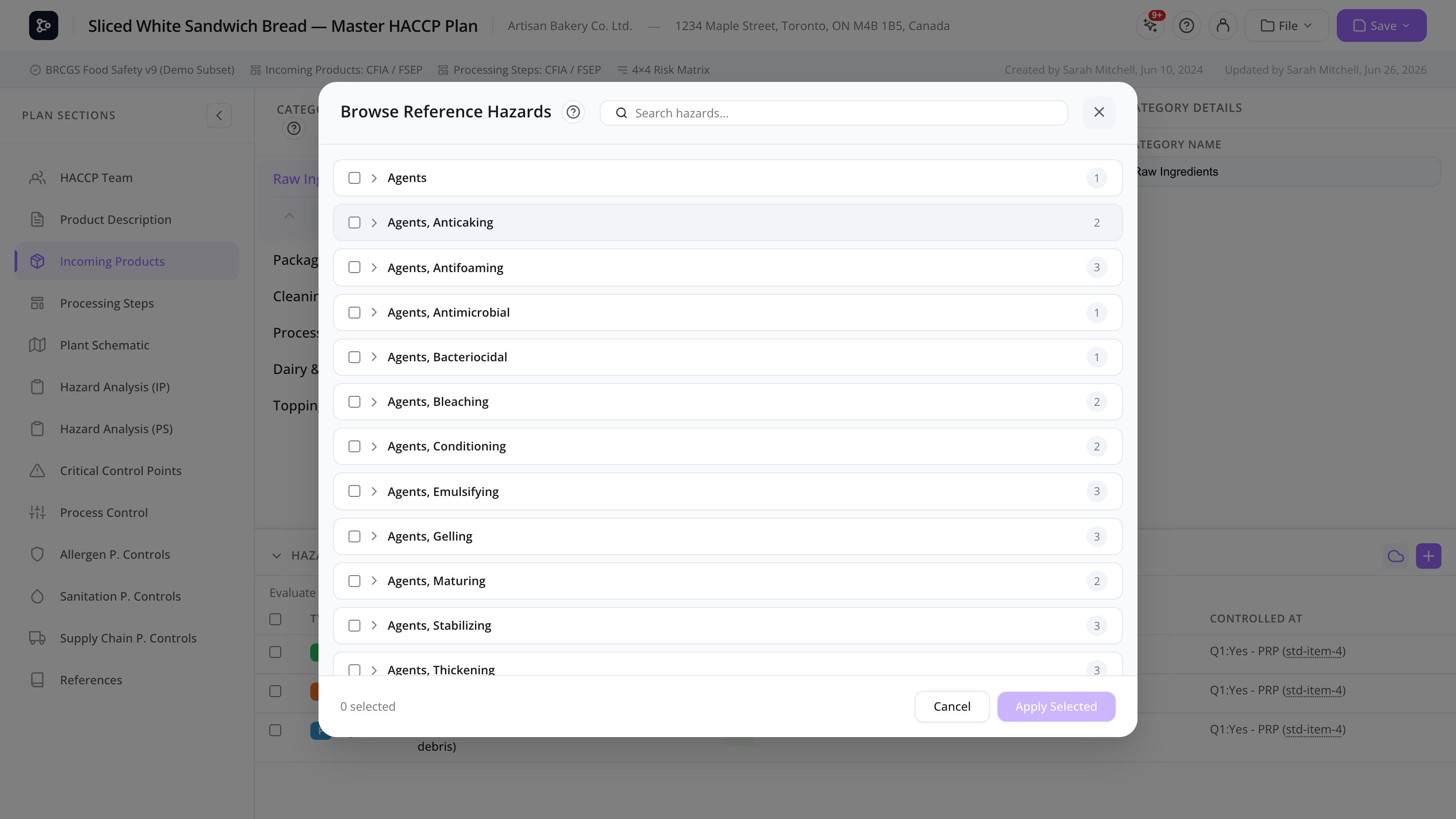
The Online Hazards browser is a built-in catalogue of pre-defined hazards organized by reference category (for incoming products) and reference processing step (for processing steps). It saves you from typing common hazards like Salmonella spp., Aflatoxins, or Metal fragments — instead, you tick the ones you want and the system adds them to your product or step in one click.
The reference database is maintained by Datahex and includes hazards across the standard categories (B / C / P / M / R / Q) with examples and pathogen links.
You reach the Online Hazards browser from the Online hazards button on a product, group, category, or processing step.
Common tasks
How to open the Online Hazards browser
- Open a product, group, category, or processing step.
- Click Online hazards (next to + Add hazard).
The modal opens, showing hazards relevant to the matching reference category or step.
How to select hazards
- Browse the list. Hazards are grouped by type (B/C/P/…).
- Use the search box to filter by hazard name, type, or pathogen.
- Tick the box on each hazard you want to add.
- Click Add selected.
The hazards are appended to the source (product/group/category/step). Existing hazards aren’t duplicated — they appear pre-ticked in the list to show you already have them.
How to filter by hazard type
Use the type pills (B / C / P / M / R / Q) at the top to show only one type at a time. Useful when you only want chemical hazards, for example.
How to use group toggle
Some references group hazards by sub-topic (e.g., Mycotoxins, Pesticide residues). Use the Group toggle to show those groups expanded or collapsed.
Screen reference
Modal layout
| Element | Description |
|---|---|
| Reference category / step name | Auto-detected from the source product/category. |
| Type pills | Filter by hazard type. |
| Search box | Filter by free text. |
| Group toggle | Expand or collapse hazard groups. |
| Hazard list | Each row: checkbox, hazard text, type, optional pathogen, examples. |
| Add selected | Adds ticked hazards to the source. |
| Cancel | Closes the modal. |
Hazard row
| Element | Description |
|---|---|
| Checkbox | Tick to add. Pre-ticked if already in source. |
| Hazard | The text (e.g., Salmonella spp.). |
| Type pill | B/C/P/M/R/Q. |
| Pathogen tag | (For biological) name of the pathogen. |
| Examples | Short context (e.g., Eggs, dairy, sprouts). |
FAQs
Why are some hazards pre-ticked? They’re already on the source product/category/step. Adding them again would be a duplicate, so they’re shown as already-included for context.
Can I edit a hazard from the Online Hazards modal? No — the modal is for adding only. To edit a hazard, close the modal and edit it back on the product or step.
The browser shows no hazards for my category — why? Either no reference hazards exist for that category in the database, or the reference category your product is mapped to doesn’t have associated hazards. Contact Datahex to have reference hazards added.
Once I add a hazard, is it linked to the reference? No. The hazard becomes a local copy on your product. Updates to the reference database don’t propagate retroactively. You also lose the reference’s pathogen/example metadata once added.
Can I add hazards in bulk to multiple products? Use category-level hazards in Incoming Products — add the hazards on the category, then choose Apply to all products with override or add. Faster than per-product tweaking.
Does Online Hazards work for processing steps too? Yes — open the Node detail panel on a processing step in the Flow Editor, then Online hazards. The list is filtered by the matching reference processing step.