Process Control
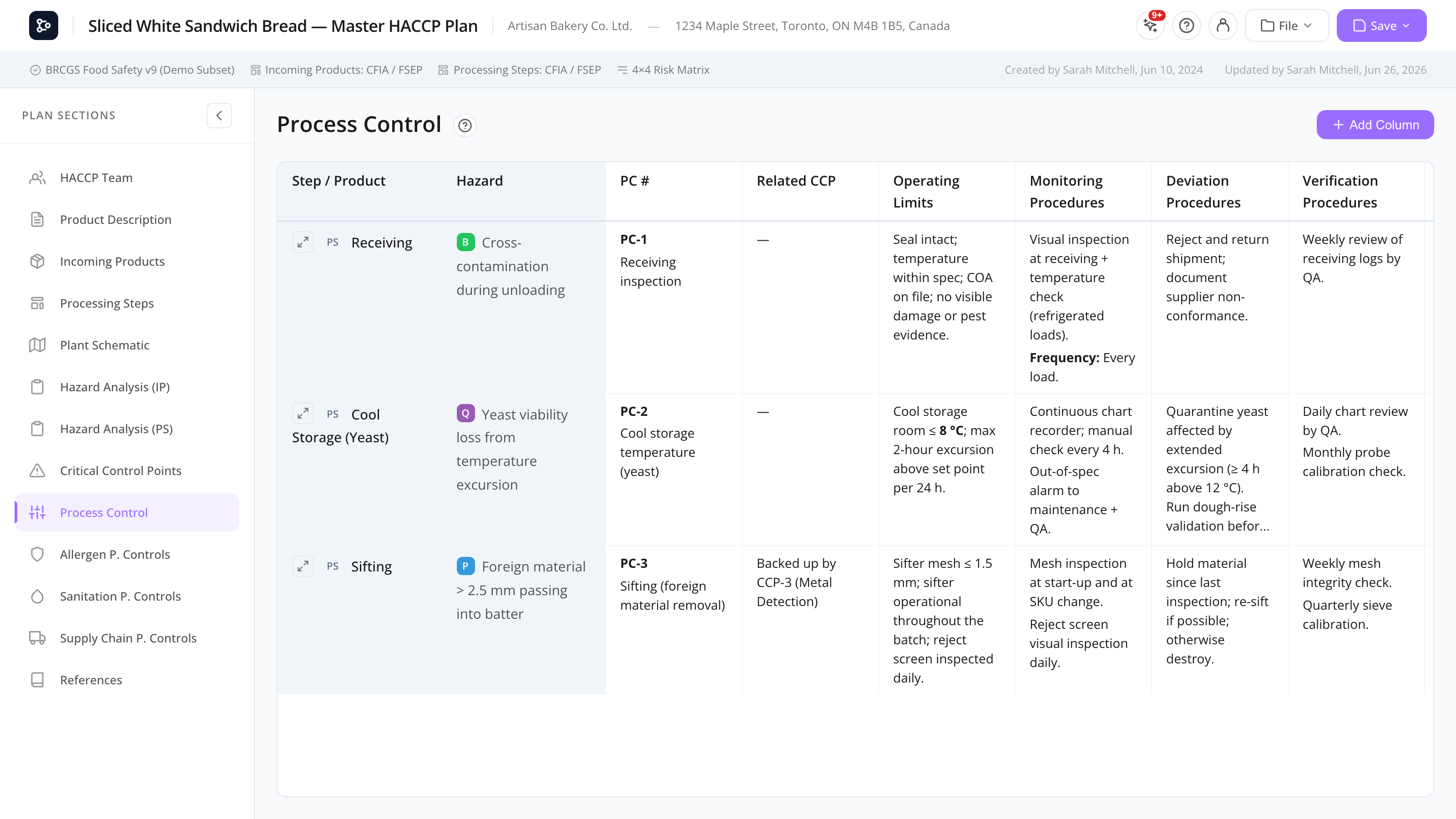
A spreadsheet-style grid for documenting each Process Control point — the same interface as the CCP grid.
What this is for
The Process Control section is a sibling grid to Critical Control Points. It uses the same interface and works the same way, but each row is a hazard evaluated as PC (Process Control) in your hazard analysis, rather than as CCP.
Process Controls cover points that aren’t full CCPs but still need monitoring. Keeping them in a separate grid keeps PCs distinct from CCPs in your plan.
Like the CCP grid, rows are auto-populated from your hazard-analysis evaluations — you don’t create them by hand. The first two columns (Step / Product and Hazard) are locked because they come from the analysis; every other column is yours to add, rename, reorder, or delete. Evaluations are gathered from every flow diagram tab, not just the active one, and when a plan has more than one diagram each row shows its diagram (see Processing Steps). Cell content is rich text (Tiptap editor).
Common tasks
How to add a PC row
You don’t add PC rows directly. A row appears automatically when you evaluate a hazard as PC in Hazard Analysis (Incoming Products) or Hazard Analysis (Processing Steps). To remove a row, re-evaluate that hazard to a different control type.
How to fill in a cell
- Click a cell to open the editor.
- Use the rich-text toolbar for headings, bold/italic, lists, and tables.
- Click Save (or Cancel to discard).
How to add a custom column
Click Add Column in the top-right of the grid, then double-click the new column’s header to rename it. The column is added to all rows.
How to rename, move, or delete a column
Double-click a column header to rename it, or click the more (…) button on the header for Rename, Move Left, Move Right, and Delete. The locked columns (Step / Product and Hazard) can’t be renamed, moved, or deleted.
How to expand a row to full screen
Click the expand icon at the left of any row to open the full-screen single-row view, which has more room to write and a toggle between grid and horizontal layouts. Click Back to Grid to return.
How to print the PC grid
Open Print preview & export. The PC grid prints as a full table with all evaluation detail, automatically rotated to landscape so the wider tables fit on the page.
Screen reference
Same layout as the CCP grid.
Columns
| Column | Locked | Description |
|---|---|---|
| Step / Product | Yes | The source step or product, with an IP or PS badge (and the diagram title in parentheses when the plan has more than one diagram). |
| Hazard | Yes | The hazard name, with its type pill (B / C / P). |
| Critical Limits | No | Often less stringent than CCP — operating limits. |
| Monitoring | No | Procedure, frequency, person. |
| Corrective Actions | No | Steps if limits are breached. |
| Verification | No | Verification procedures. |
| Records | No | Where logged. |
The non-locked columns above are starting defaults — add, rename, reorder, or delete any of them.
Default column headers follow your interface language automatically — switch between English and French and the standard headers switch with you, including in existing plans, the print/PDF export, and the Verify Plan report. Columns you renamed yourself keep the exact name you typed.
Toolbar
| Control | What it does |
|---|---|
| Add Column | Adds a custom column at the end. |
| Column more (…) menu | Rename, Move Left, Move Right, or Delete that column. |
| Row expand icon | Opens the full-screen single-row view. |
Differences from CCP
| Aspect | CCP | PC |
|---|---|---|
| Auto-population trigger | Hazard evaluated as CCP | Hazard evaluated as PC |
| Use case | Steps where loss of control = unsafe food | Steps where loss of control = quality/process issue |
FAQs
Where do these rows come from? They’re pulled from your hazard analysis. Any hazard evaluated as PC — on an incoming product or a processing step — becomes a row here automatically. You can’t add rows by hand.
Why do I see steps from another diagram? The grid aggregates PC evaluations from every flow diagram tab, not just the active one, so nothing is hidden when you switch tabs. When a plan has more than one diagram, each row shows the diagram title in parentheses. See Processing Steps.
What’s the difference between CCP and PC?
- CCP (Critical Control Point) — failure causes a food safety risk. Required to have measurable critical limits.
- PC (Process Control) — failure causes a process or quality issue, not a food safety risk. Operating limits, less stringent.
The decision tree determines which a hazard becomes. In some standards (FSMA), Process Preventive Controls (PCP) are used instead — see your standard’s guidance.
Can the same hazard be both a CCP and a PC? Not on the same evaluation. If you re-evaluate the hazard differently, the new evaluation replaces the old. You can have two separate hazards on the same product/step where one is CCP and another is PC.
Why don’t I see a PC tab in my plan? Either no hazards have been evaluated as PC yet, or the section was turned off in the Setup wizard. Re-enable it from the setup options.
Should I use CCP and PC, or just CCP? Follow your standard. Some standards (HACCP-only) use just CCPs. GFSI standards (BRC, SQF, FSSC22000) often distinguish CCPs from PRP-based controls or PCs.
Can I add my own columns? Yes — click Add Column, double-click the header to name it, and reorder or delete the ones you added. Only the two locked columns can’t be changed.