Sanitation Controls
A rich-text section for documenting your sanitation programs.
What this is for
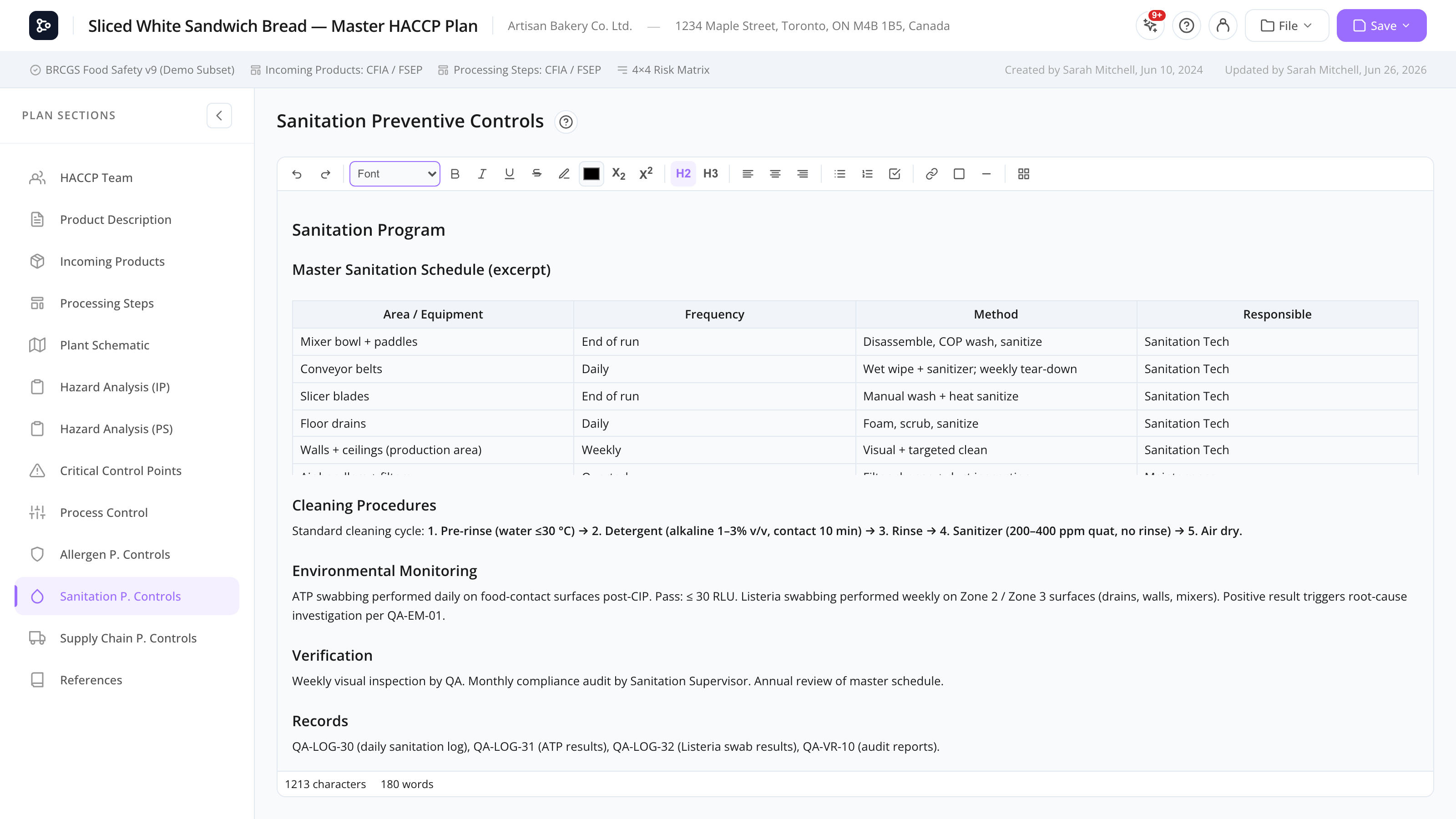
The Sanitation Controls section is where you describe your plant’s cleaning and sanitation program: master sanitation schedules, cleaning chemical concentrations, equipment-specific procedures, environmental monitoring, verification, and records.
The interface is identical to Allergen Controls and Supply Chain Controls — a Tiptap-based rich-text editor with full formatting, tables, and images.
Common tasks
How to structure your sanitation program
A common layout works well in this section:
- Master sanitation schedule — a table of areas, equipment, frequency, method, and responsible person.
- Cleaning procedures — step-by-step instructions per area or per piece of equipment.
- Sanitizers and chemicals — concentrations, contact times, safety precautions.
- Environmental monitoring — swab plan, pathogens monitored, frequency, response to positives.
- Verification — how the program is checked (ATP swabs, visual inspection, lab tests).
- Records — where logs are kept.
The editor supports headings, tables, lists, and images so you can match your existing SOP format.
How to add a master sanitation schedule
- Add an H2 heading, e.g., Master sanitation schedule.
- Click the Table icon and pick a 5-column table (Area / Equipment / Frequency / Method / Responsible).
- Type your data into each row.
- Add rows as needed by right-clicking → Insert row below.
How to embed equipment photos
- Drag a JPG/PNG image of the equipment into the editor.
- The image is uploaded and embedded.
- Add a caption with a paragraph below it.
How to use lists for cleaning steps
For step-by-step procedures, use a numbered list. Press Tab to create indented sub-steps.
Screen reference
Same as Allergen Controls — see that page for the toolbar reference. The Sanitation Controls section is just a separate slot in the plan with the same editor.
FAQs
Should I write everything in this section, or just reference an external SOP? Either works. Many plans use a hybrid: a high-level summary in this section plus references (in References) to detailed external SOPs. Auditors typically want both available.
Can I import an existing Word document of my sanitation SOPs? Open the Word document, copy all, and paste into the editor. Most formatting (headings, tables, lists) carries over. Check the result and clean up any edge cases.
My sanitation program is huge — should I split it into multiple sections? There’s no built-in way to add multiple sanitation sections. Either keep everything here with H2 headings, or move the very detailed parts into a referenced external SOP and keep a summary here.
Can I link a sanitation procedure to a CCP? Not as a structured link. You can mention the CCP in the sanitation text (e.g., “See CCP-3 for cooking temperature monitoring”) and rely on the printed table of contents.
Are images from the Sanitation section searchable? The text is searchable across the plan; images are not OCR’d. If you need a key fact in an image (a cleaning concentration, a procedure step), also write it in text.