Hazard Analysis (Incoming)
The consolidated table of every evaluated hazard from your incoming products.
What this is for
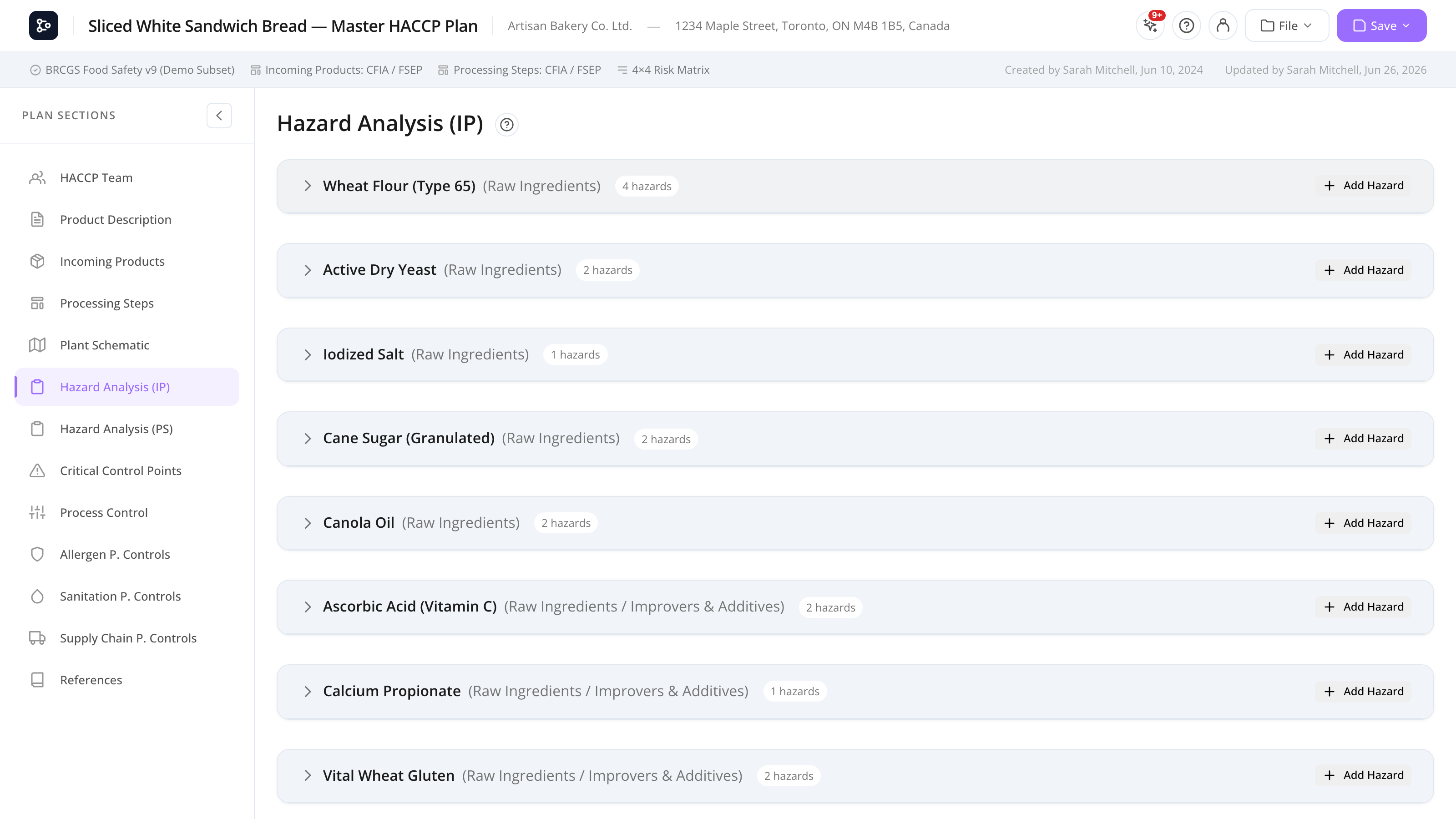
The Hazard Analysis (Incoming Products) section is a read-only consolidated table that shows every hazard you’ve evaluated in the Incoming Products section. Hazards are grouped into collapsible blocks by source (category, group, or product); each block lists its hazards as rows.
It’s read-only here — clicking a row opens the hazard modal back in Incoming Products to edit. The table also drives the printed Hazard Analysis page, which carries the full evaluation detail (see Print preview & export).
Common tasks
How to read the table
Each source is a collapsible block. The block header shows the source name (a product, or a category / group), and a count of its hazards. Click the header (or its chevron) to expand it and reveal the hazard rows. Each row has these columns:
- Type — a coloured badge: B / C / P / M / R / Q (or a custom type).
- Hazard — the hazard description (e.g., Salmonella spp.).
- Risk — the risk level from the matrix (e.g., Low / Medium / High / Critical), with the underlying S: severity and P: probability values. Shows N/D when severity or probability hasn’t been set.
- Q1–Q6 — the answer recorded for each decision-tree question. Hover a question header to read the full question text and its yes/no outcomes.
- Controlled at — pills showing the control type (PRP / CCP / PC / PCP), any PCP controls, the selected program codes, and expandable justification / steps detail.
How to edit a hazard
- Click a row.
- The hazard modal opens at the source product / group / category.
- Edit the hazard or re-run the evaluation.
- Save and return.
The table updates automatically.
How to read a program code
When a control references a prerequisite-program item, its code (e.g. A.1.1.1) appears as a pill in the Controlled at column. Hover the code to read the program’s full text in a tooltip — you don’t have to open the program to check what it says.
How to expand justification or steps detail
The Controlled at column condenses long text. Click the Just: pill to expand the full justification, or the Steps: pill to expand the list of linked processing steps. Click again to collapse.
Screen reference
Columns
| Column | Description |
|---|---|
| Type | Hazard category badge (B / C / P / M / R / Q / custom). |
| Hazard | The hazard description. |
| Risk | Risk level from the matrix, with the S: / P: values. N/D if not scored. |
| Q1–Q6 | Recorded decision-tree answers. Hover the header for the question text. |
| Controlled at | Control-type pills, PCP controls, program-code pills (hover to read), and expandable justification / steps. |
Source blocks
| Element | What it does |
|---|---|
| Block header | Shows the source (category / group / product) and its hazard count. Click to expand or collapse. |
| Add hazard button | Opens the hazard modal to add a new hazard to that source. |
| Program-code pill | Hover to read the full program text in a tooltip. |
| Just: / Steps: pill | Click to expand the truncated justification or linked steps. |
FAQs
Why is a source block empty when I have hazards on that product? Only hazards that carry a recorded evaluation (control type / decision-tree answers) show their full detail. Open the hazard in Incoming Products and complete the decision tree.
Can I edit a hazard from this page? Click a row to open the hazard modal at its source. The actual edit happens in Incoming Products.
How do I read a program code without opening the program? Hover the program-code pill (e.g. A.1.1.1) in the Controlled at column. A tooltip shows the program’s code, name, and full text.
Why do I see more than one pill on one hazard? A hazard can have more than one control type (e.g. both PRP and CCP), plus PCP controls and one or more program codes. Each is shown as its own pill.
The risk colour doesn’t match what I expected. The risk level and colour come from the Risk Matrix selected in Setup. Each cell of the matrix maps to a level with a colour. Adjust the matrix in the Matrix Library if needed.
Where do I get the full printed evaluation? The printed Hazard Analysis page prints in landscape with the full evaluation detail — decision-tree legend, pathogens and examples under the hazard name, and the complete control conclusion. See Print preview & export.